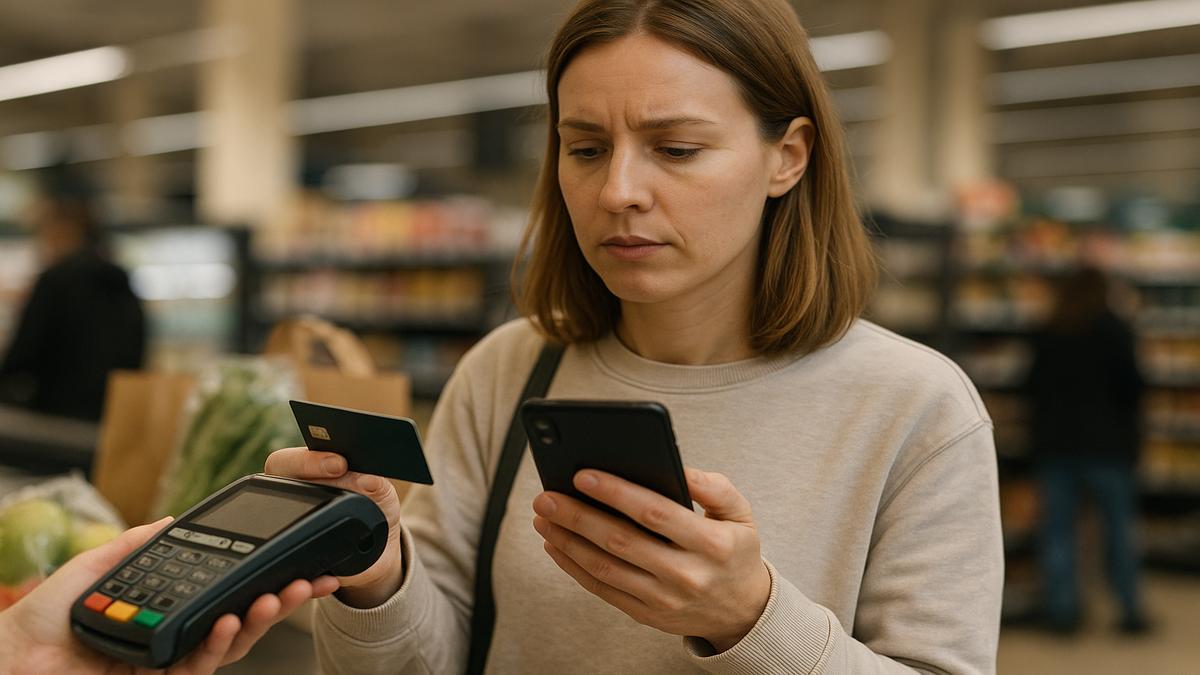
The first thing you notice is the sound. Not the beeps of the scanner or the soft thud of groceries landing on the conveyor, but the sudden hush that ripples out from the card reader. It’s the kind of silence wrapped in fluorescent light and recycled air, the kind that magnifies your own heartbeat. You’ve just swiped or tapped, the little screen blinks, and then it appears in tiny, merciless letters: Card declined.
Your cheeks get hot. You feel the weight of the line behind you, the shifting feet, the polite-but-annoyed sighs. The cashier gives that sympathetic half-smile you recognize instantly: they’ve seen this before, and they’re already reaching to void the transaction, to ask if you have another card, another way to pay, another way not to be that person.
But you aren’t stuck here. Not this time.
You slide your phone from your pocket, pulse racing, mind already spinning through worst-case scenarios. Did my paycheck not clear? Did someone hack my account? Did I accidentally buy something wild at 3 a.m.? Or is this just another random fraud flag, another algorithm thinking it knows my life better than I do?
Here’s what most people don’t realize: you can often reverse this moment—right there at the checkout, with one quick, quiet move on your phone—before anyone in line really understands what’s happening.
The Silent Panic at the Register
The checkout line might be the most public private moment you experience in a normal day. Everything you’ve chosen—your food, your shampoo, your late-night snacks, your kid’s cereal—is laid out for a stranger to scan, and then your money (or your lack of it) gets put on display.
When that little screen flashes Declined, the panic is rarely just about money. It’s about exposure. About judgment. About the sudden fear that you’re not as in control as you thought you were.
In that electric second, people usually do one of three things:
- Fumble for another card, hoping it works.
- Ask the cashier to cancel the order, mumbling something about “I’ll be right back.”
- Stare at the screen like it might suddenly apologize and process the payment anyway.
But there’s a fourth option—swift, modern, strangely empowering—that’s hiding in the rectangle of glass and metal sitting in your hand or pocket. You don’t need to call your bank and wait on hold, and you don’t have to run out to the car or admit anything out loud. You can often fix it with a sequence of taps that takes less time than the person behind you scrolling social media while they wait.
The Quick Phone Hack That Saves the Moment
Nearly every major bank, credit union, and card issuer now has an app, and hiding inside those apps is a cluster of tools that talk directly to the systems that just decided to embarrass you. The trick is knowing exactly where to look and what to do—fast.
What you’re really trying to do in that awkward moment is this: figure out why the card was declined, fix the root of that problem if you can, and get the payment re-run before the situation turns into a scene.
Here’s a simple, almost muscle-memory pattern you can use whenever that dreaded message shows up:
- Open your banking or card app immediately. You don’t have to say a word yet. Just say to the cashier, “One sec—let me check something,” in a calm voice.
- Go straight to your card’s recent activity and alerts. Most apps show a banner like “Your card is locked” or “Suspicious activity detected.” That banner is your closest friend right now.
- Look for a temporary lock or security hold. You may see a toggle that says “Card on/off,” “Freeze card,” or “Lock card.” If it’s switched off, turn it back on.
- Check for security alerts you can clear with one tap. Many apps now pop up: “Is this you?” with the merchant’s name. You tap “Yes, it’s me,” and the system loosens its grip.
- Ask the cashier, calmly, “Can we try that one more time?” Now that the app has updated, there’s a good chance the payment will slide through like nothing ever happened.
In real time, if you move quickly, this can take less than thirty seconds. To the people in line, it just looks like you had to unlock your phone or approve something. You’re not stuck explaining your finances to a stranger; you’re just another customer dealing with some routine little tech hiccup.
What’s Actually Happening Behind That Decline
To understand why this hack works so well, you have to peek—just briefly—behind the curtain at how your bank and card companies think. They don’t know you as a person with a favorite coffee order and a dog that eats socks. They know you as a pattern.
They’ve watched you buy groceries at the same store every Sunday morning, fill up at the same gas station near your job, occasionally splurge on takeout or a new hoodie. They build a mental map of your “normal.” So when they spot something just a little off—like you suddenly buying gas three states away, or making three medium-sized charges in two minutes, or shopping at an online store that’s been connected to fraud before—they get nervous.
But nervous computers don’t chew their nails; they flip switches. Sometimes they:
- Temporarily lock your card.
- Flag your transaction as suspicious and auto-decline it.
- Trigger a safe-mode limit, where they need your confirmation to continue.
In the old days, your only option was to call the number on the back of your card, wait on hold under the fluorescent glare, and shout your details over a chorus of grocery store beeps. Now, those same systems are wired into your phone app, waiting for your quiet little tap to say: “That really was me. Let it through.”
| Situation at Checkout | What to Check in Your App | Fastest Fix |
|---|---|---|
| Card suddenly declined, no warning | Card status (locked/frozen), fraud alerts | Toggle card “on,” confirm “Yes, this is me” |
| You’re traveling or in a new city | Travel notice settings, location-based controls | Enable travel mode, allow international or out-of-area use |
| Large purchase compared to normal spending | Spending limits, pending alerts | Temporarily raise limit or approve the specific transaction |
| Contactless tap declined | Contactless settings, recent transactions | Retry as chip insert or swipe after checking status |
| You think you might be near your limit | Available balance/credit, pending payments | Move money from savings, or choose a smaller total now |
The Micro-Script That Buys You Time
There’s another small skill that makes this hack nearly invisible: how you hold the moment socially. The line, the cashier, the soft feeling of being watched—all of that can either spike your panic or slide right past you if you have a simple script ready.
You don’t need to overshare, and you don’t owe anyone an explanation of your bank account. You just need a sentence that politely buys you thirty to sixty seconds while you work your quiet magic on your phone.
Here are a few that work almost anywhere:
- “Oh, weird—let me quickly approve this on my bank app.”
- “My bank’s being cautious today. One sec while I unlock the card.”
- “Give me a moment—my phone needs to verify this.”
These phrases do a few clever things at once. They:
- Shift blame from you to “the bank” or “the app.”
- Signal to the cashier that this will probably be resolved quickly.
- Tell the people in line that this is a tech delay, not a drama.
Then, eyes back to your screen, you move through your now-familiar pattern: alerts, card status, toggle, confirmation, deep breath.
The moment your app confirms that your card is active and the suspicious activity is cleared, you glance up, give a small nod, and say, “Okay, should be good now—can we try again?” Often, the second attempt slides through silently, like the whole situation never happened.
Turning a Stress Spike into a Quiet Superpower
There’s a strange satisfaction in learning how to handle something that once felt terrifying. The first time you use this little phone hack at the register, your palms might still sweat. But as you practice, something subtle shifts: you stop feeling like a victim of mysterious systems, and you start feeling like someone who knows how to speak their language.
Instead of spiraling into worst-case fantasies—“My account is empty, I’ve been hacked, I’m doomed”—you zoom in on the concrete questions:
- Is my card locked?
- Did the bank flag this as suspicious?
- Is this a limit issue I can fix right now?
Most of the time, the answer lives in one of those three buckets. And in each one, your phone is the remote control. As long as your app is up-to-date and you remember your login details, you can stand there—in the gentle hum of the store’s air vents, under the glow of checkout lights—and quietly rearrange the invisible wires behind your plastic card.
Of course, sometimes the answer is less glamorous. Maybe you really did hit your limit, or an automatic bill cleared earlier than you realized. Sometimes the best you can do is move money between accounts or choose a smaller purchase for now. But even then, this moment becomes a choice rather than a surprise. You’re informed. You’re deciding. That tiny bit of agency changes how it feels to walk away.
Designing Your Own “No-Panic Checkout” Routine
The phone hack itself is fast, but its power multiplies if you’ve prepared just a little in advance—long before you’re trying to remember passwords with a line of customers watching the back of your head.
Think of it like packing a small, invisible toolkit you carry everywhere your card goes. Here’s how to set it up:
1. Get Your Banking App Ready Before You Need It
Install the official app for every card you actually use—the debit card that runs your daily life, the credit card you use for big purchases, the backup you keep just in case. Log in at home, on your own time. Turn on biometric sign-in if your phone allows it: fingerprint, face recognition, or a simple PIN. The goal is to be able to open that app instantly at checkout without fighting your own security.
2. Find the “Panic Buttons” Ahead of Time
Open your app and look for:
- Card controls: Where can you lock or unlock the card?
- Travel or location settings: Can you tell the bank you’ll be out of town?
- Alerts and notifications: Where do fraud alerts show up? Can you approve or deny suspicious transactions from your phone?
Poke around until you know exactly which buttons you’d tap in a rush. Think of it like practicing the emergency exits for your finances.
3. Turn On Real-Time Alerts
Most apps let you enable instant notifications for:
- Every transaction over a certain amount.
- Any declined transactions.
- Suspicious or out-of-pattern activity.
These alerts act as your early-warning radar. Sometimes you’ll see a message like, “We declined a transaction at [Store]—was this you?” before the cashier can even look up. You tap, “Yes, it was me,” and by the time they ask if you want to try again, the system is already cleared.
4. Know Your Actual Limits
Quietly, maybe on a Sunday morning with coffee in hand, look at:
- Your daily ATM or spending limit.
- Your current credit card balance and available credit.
- Any “soft” internal limits or alerts the bank uses.
This doesn’t have to be a guilt trip. It’s just a map. Once you know the shape of the terrain, you’re less likely to be surprised by an invisible wall halfway through your grocery list.
5. Practice the Workflow Once When No One’s Watching
Open your app and walk through the motions: find card controls, open alerts, imagine what you’d do if something was locked. The more familiar it feels in a calm moment, the easier it will be when the checkout line is buzzing around you.
When the Hack Can’t Help (And What That Tells You)
Even with all this, there will be rare times when your quiet phone dance doesn’t fix the decline. The app shows no lock, no suspicious activity, no obvious reason—yet the card reader keeps shaking its digital head. That’s not a failure of the hack; it’s a clue.
In those moments, you might be facing one of these:
- A network outage: The payment system itself is down or struggling, especially during busy hours or storms.
- A deeper security freeze: The bank has locked things down harder than your app controls can reach, possibly after a serious fraud risk.
- A real balance or limit issue: The numbers just aren’t there this time.
Instead of spiraling, you can treat this like information. You’ve ruled out what you can control from your phone; now you know it’s time for a conversation with your bank—later, in private, when you’re not standing between someone’s ice cream and their drive home.
In the moment, you still have graceful exits available:
- Use another card or a mobile wallet with a different funding source.
- Ask the cashier to pause or save the order while you step aside to figure out a backup plan.
- Take a smaller portion of your purchase now and return for the rest later.
Even then, the hack has done something important: it has shifted the story from “I’m helpless and embarrassed” to “This is annoying, but I understand what’s happening, and I have options.”
Owning the Moment, Quietly
So you’re back in line, in that familiar, humming space where everyone pretends not to look at everyone else’s groceries. Your cart holds a week’s worth of meals, some small indulgences, the boring essentials that keep your life quietly running. You tap your card, or your phone, or your watch. The screen blinks.
If that unwelcome word appears again—Declined—you’ll still feel something in your chest. That’s human. But now, instead of freezing, your hand moves almost on its own: phone out, app open, eyes scanning for the tiny alert that explains the whole drama. You know where the card controls live. You know what to tap. You know how to buy yourself a minute of patience from the cashier and the line.
And when you say, “Let’s try that again,” there’s a very good chance the only sound anyone will remember is the soft, approving beep as your payment finally slides through.
The fluorescent lights hum on. The conveyor moves. The world doesn’t end. You pick up your bag, thank the cashier, and walk out into the sunlight knowing something quietly powerful: sometimes, the difference between public embarrassment and a small, forgettable glitch is just a tiny, practiced dance between your card, your phone, and your own calm voice.
FAQ
What if I don’t have my bank’s app installed when my card is declined?
You can still ask the cashier to pause the transaction and call the number on the back of your card, but that usually takes longer and feels more exposed. As soon as you get home, install your bank or card issuer’s app, log in, and set up biometric access so you’re ready next time.
Can this phone hack work if I really don’t have enough money or credit?
No app can override your actual balance or credit limit. What it can do is show you your real-time numbers, let you move money from another account if available, or help you decide to buy a smaller amount now and come back later.
Is it safe to unlock my card or approve transactions from my phone?
Yes, as long as you use your official banking app, keep your phone locked with a PIN or biometrics, and don’t approve any charges you don’t recognize. If an alert shows a transaction you didn’t make, deny it and contact your bank immediately.
What if I forget my login or can’t access my banking app at checkout?
If you’re locked out of your app, you can try another payment method, ask to set your items aside, or step out of line to call your bank. Later, reset your app login details in a calm setting so you’re not stuck next time.
Will telling the cashier “My bank is being cautious” really help?
Yes. It keeps the explanation neutral and normal—banks decline or flag transactions all the time for security reasons. Most cashiers have seen it happen dozens of times and will gladly give you a moment while you sort it out on your phone.

Hello, I’m Mathew, and I write articles about useful Home Tricks: simple solutions, saving time and useful for every day.